Chat Settings
This article covers everything that is set with the command /chat_settings.
First steps
For almost all settings for a chat, you need to register the chat in GeckoBot first. GeckoBot does not automatically have a list of all chats it is in -- it needs to be told explicitly that a new chat is registered and an entry in the database in the table of chats settings is created. This opens up opens up lots of possibilities, mainly saving saving unique trigger texts for given commands (arrows, drugs), -- all bound to the fact that a database entry must be available first, with a specific chat_id which is the identifier for all settings that will be saved later for this chat.
Example sue:
/addguildchat
Ambush Pings
Parsing ambush messages form the guild quest "Forbidden champions hunt" can be turned on and off:
/message_ambush_on/message_ambush_off
Turning on parsing the ambush messages gives messages as follows:

Notes: The first message shown here is the part that can be unique per guild. In [FTW] we only set two commands that can be clicked to either send a bunch of messages to ping all low level players or send a bunch of messages to ping high levels players. But every guild can decide for itself. This message can also contain the real &'s o f of the users to ping the m a notifier about an ambush..This unique message can be configured with /modifyambushpings {Your text o or pings.
An example to ping many users and generating more than one unique message is shown in this example:
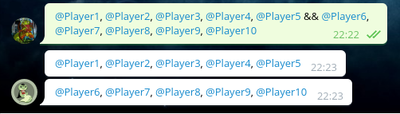
/modifyambushpings @Player1, @Player2, @Player3, @Player4, @Player5 && @Player6, @Player7, @Player8, @Player9, @Player10.
The "&&" is the sign that means that a message is split there. See the following output how a trigger with && is split and multiple messages are sent therefore. This way you can make sure that everyone is actually pinged (-> telegram restriction of only pinging at maximum 5 players per message).