Chat Settings
This article covers everything that is set with the command /chat_settings.
First steps
For almost all settings for a chat, you need to register the chat in GeckoBot first. GeckoBot does not automatically have a list of all chats it is in -- it needs to be told explicitly that a new chat is registered and an entry in the database in the table of chats settings is created. This opens up opens up lots of possibilities, mainly saving saving unique trigger texts for given commands (arrows, drugs), -- all bound to the fact that a database entry must be available first, with a specific chat_id which is the identifier for all settings that will be saved later for this chat.
Example sue:
/addguildchat
Ambush Pings
Parsing ambush messages form the guild quest "Forbidden champions hunt" can be turned on and off:
/message_ambush_on/message_ambush_off
Turning on parsing the ambush messages gives messages as follows:

Notes: The first message shown here is the part that can be unique per guild. In [FTW] we only set two commands that can be clicked to either send a bunch of messages to ping all low level players or send a bunch of messages to ping high levels players. But every guild can decide for itself. This message can also contain the real &'s o f of the users to ping the m a notifier about an ambush..This unique message can be configured with /modifyambushpings {Your text o or pings.
An example to ping many users and generating more than one unique message is shown in this example:
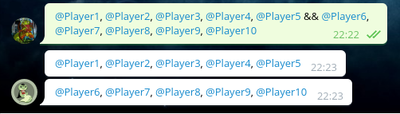
/modifyambushpings @Player1, @Player2, @Player3, @Player4, @Player5 && @Player6, @Player7, @Player8, @Player9, @Player10.
The "&&" is the sign that means that a message is split there. See the following output how a trigger with && is split and multiple messages are sent therefore. This way you can make sure that everyone is actually pinged (-> telegram restriction of only pinging at maximum 5 players per message).

Enounter Pings
Encounter ping messages are very similar to the ambush ping messages. You can turn on and off parsing encounter messages with
/message_encounter_on/message_encounter_off
The parsed and processed encounter message will give such a result:

The fight button forwards the fight link to any chat of the user choice (needs to go to game bot obviously). The claimed button is so that users can show they already took the encounter and others don't have to try anymore. In case of a mistakenly pressed "claim button", the fight button stays available to allow others to take the fight instead.
With the command /modifyencounterpings @Player1, there is the possibility to add pings below the actual encounter message. Here, there is no modifier enabled to split the message to ping more users.

Encountermessage with additional ping on the bottom. Also: if the user activated API access and the API reacts quickly enough, there will be a message above the actual encounter showing the HP of the user who found it. This can be used to check out the risk involved in taking the encounter.
Roster Ping Slacking Members
It is possible to allow parsing /g_list messages in the last 30min before battle and ping every (to GeckoBot known) member who is not on attack or defense. This was made to improve battle participation. The command to turn on and off reacting
to the roster messages are:
/message_battlepings_on/message_battlepings_off

If a /g_list message is forwarded to the chat with the battlepings setting online, then all sleeping users will get pinged, as oyu can see in the example output above.
